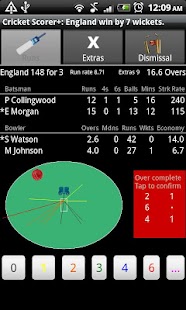
Cricket Scorer+ for Android
If this happens please uninstall, reinstall and leave this setting off for now.
**If you are not an official scorer for a team, you may enjoy keeping score as you watch limited overs, Twenty20, IPL, or a Test match live or on television, perhaps while watching your child play.
Many users of this app manage to umpire and keep score at the same time.
* Just touch where the ball reached, then pick how many runs were scored
* Produces wagon wheels for each batsman and an e-mailable scorecard (including a wagon wheel page per batsman plus Worm and Manhattan scoring rate charts/graphs) for publishing to a web site, transfer to a computer or simply to send to your team
* Press Menu button for scorecard and then More ...
for other features such as saving/loading a game
* Long tap batsman, bowler and 'This Over' areas of Runs tab for less commonly used actions such as retired hurt or declare innings
Works well on phones and also on small (7 or 8 inch) tablets .
Works on large tablets, but layout could be better.
Cricket Scorer+ for Android is Cricket Scorer for Android PLUS the following new features/changes, many requested by users.
Please try out the free version first if you wish.
1.
Added more information to scorecard, extra columns on scorecard for batsmen (minutes, 4s, 6s & Strike Rate) and bowlers (number of wides and number of no balls)2.
Runs worm chart (graph) for comparing innings scoring rate of teams3.
Manhattan bar chart of runs per over and dismissals4.
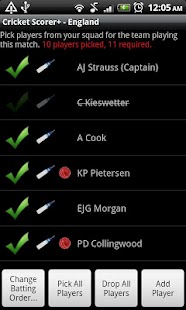
Ability to save squads of players and pick teams from them5.
Re-ordering of players6.
Scoring zones with totals on the wagon wheels - these can be e-mailed too7.
Set number of players in a team (between 4 to 20)8.
2 innings per side i.e.
4 in total option9.
Option to not prompt for next bowler but to automatically pick other from current pair10.
Added runs per wide and runs per no ball config to match setup screen11.
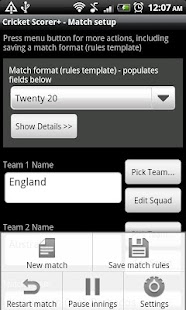
Can now set match date and time in match setup, and this appears on scorecard12.
Added "Light theme screens" option in settings so easier to read in bright light13.
Made dot balls easier to read in "This over" block14.
Batsmen crossed tick box now available for run out and caught & bowled dismissal methods too.15.
Set default squad (one to use when starting new match automatically)16.
Save match formats (different sets of rules for different type of game)17.
Set default match format (one to use when starting new match automatically)18.
Export to Cricket Statz MXP file(www.cricketstatz.com), multi-sheet Excel xml or simple xml files19.
Added innings summary at top of scorecard with hyperlinks to each innings20.
High resolution wagon wheel images option for higher quality printing of wagon wheels (after have been e-mailed)21.
Can now indicate which players are bowlers, so fewer players to pick from when choosing the next bowler22.
Option to hide "0s (left)" and "Play/Miss" columns on wagon wheel23.
Restart match option - restarts timings and clears out all deliveries.
Handy if you set the match up in advance.24.
More settings for customizing the behaviour of the app25.
Over numbering now starts at 1 instead of 0 in over by over bowling details of scorecard26.
New setting for optional extra columns in bowling statistics summary table for no ball extras total in addition to no ball count and similarly for wides.
27.
New setting for simple scorecard.
Can hide the ball by ball details.28.
Added tick box for extra ball for wide/no ball in match format - default on29.
Can pause the innings so minutes batting doesn't become incorrect because of rain breaks or planned intervals30.
Can save a team from an old Android Cricket Scorer match as a squad to re-use in other matches31.
Tweet/share score at any point or at end of over
For more info and FAQs see https://sites.google.com/site/androidcricketscorer/plus
About Cricket Scorer+ for Android
- Package name (App ID)
- com.echoz.tc.cricketscorerplus
- Available on
- Google Play
- Price
- Free
- Version
- v2.0.14a
- Developer
- NDTV Official App
Looking for the Cricket Scorer+ for Android APK?
The safest way to get Cricket Scorer+ for Android (com.echoz.tc.cricketscorerplus) on your Android device is to install it directly from Google Play — you'll always get the latest official version, automatic updates, and no risk of modified or infected APK files from third-party sites.
Music Features
Enjoy high-quality music streaming and playback features.
Social Features
Connect and share with friends and the community.
Gaming Features
Enjoy immersive gaming experience with various game modes.
See Cricket Scorer+ for Android in Action
Frequently Asked Questions
Is Cricket Scorer+ for Android free?
Yes, Cricket Scorer+ for Android is free to download and install on Android through Google Play.
How do I install Cricket Scorer+ for Android on Android?
Open Google Play on your Android phone or tablet, search for Cricket Scorer+ for Android by NDTV Official App or tap the Google Play button on this page, then tap Install. The app downloads and installs automatically.
What is com.echoz.tc.cricketscorerplus?
com.echoz.tc.cricketscorerplus is the App ID (package name) of Cricket Scorer+ for Android on Google Play. Every Android app has a unique package name, and it is the safest way to verify you are installing the official app.
Is Cricket Scorer+ for Android safe to download?
Installing Cricket Scorer+ for Android from Google Play is the safest option: you get the official version published by NDTV Official App, verified by Google Play Protect, with automatic updates. Avoid APK files from unofficial third-party sites.

Get Cricket Scorer+ for Android Today
Cricket Scorer+ for Android for Android — free download on Google Play.
Compatible with Android phones and tablets — available on Google Play.
Ask AI about this app
Get instant answers about features, tips and more from popular AI assistants.